The journey of one durable event
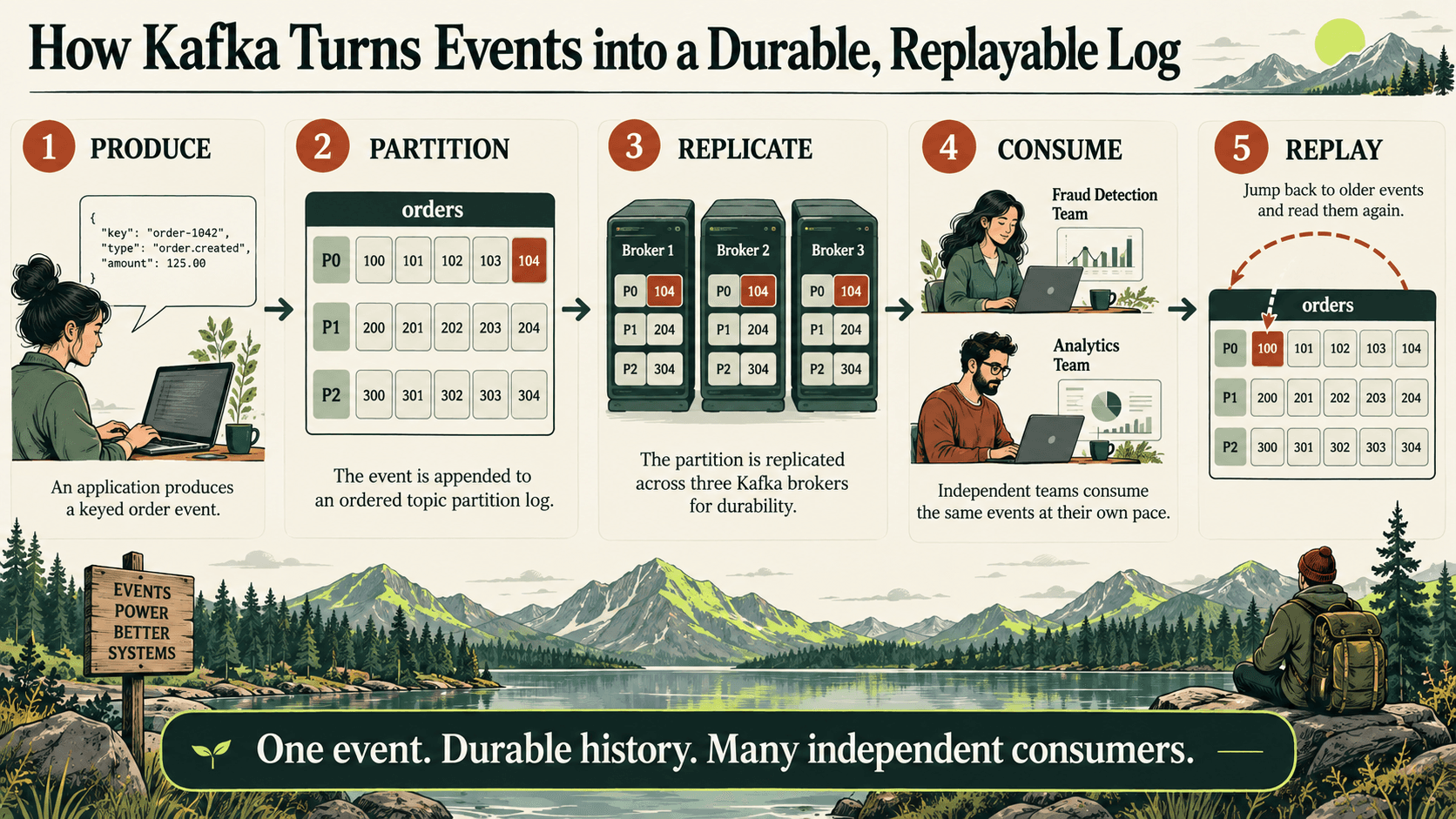
THE EVENT JOURNEY · ANIMATED SUMMARY
INTERACTIVE ARCHITECTURE LAB
Follow one event through Kafka
Choose a topic, inspect its partition, switch consumer groups, then publish or replay.Producer
Checkout service
- Event
- order.created
- Key
- customer-42
Kafka cluster
Click a topic and partition to drill in.
Independent consumers
Processes orders once business rules pass.
order.createdtopic orderspartition P0offset 42Reading does not delete the event. Retention controls how long it remains replayable.Apache Kafka is a distributed event-streaming platform. Applications write events to named streams called topics; Kafka stores those events durably and lets one or many applications read them now or later. This combination—transport, retained log, replay, and distributed processing—is why Kafka sits behind payment flows, order systems, telemetry pipelines, data integration, fraud detection, and real-time analytics.
The simplest useful mental model is a shared, append-only journal. Producers add entries. Kafka assigns each entry a position. Consumers read at their own pace and remember where they stopped. Unlike a traditional queue, reading an event does not normally delete it: retention policy determines how long it remains available.
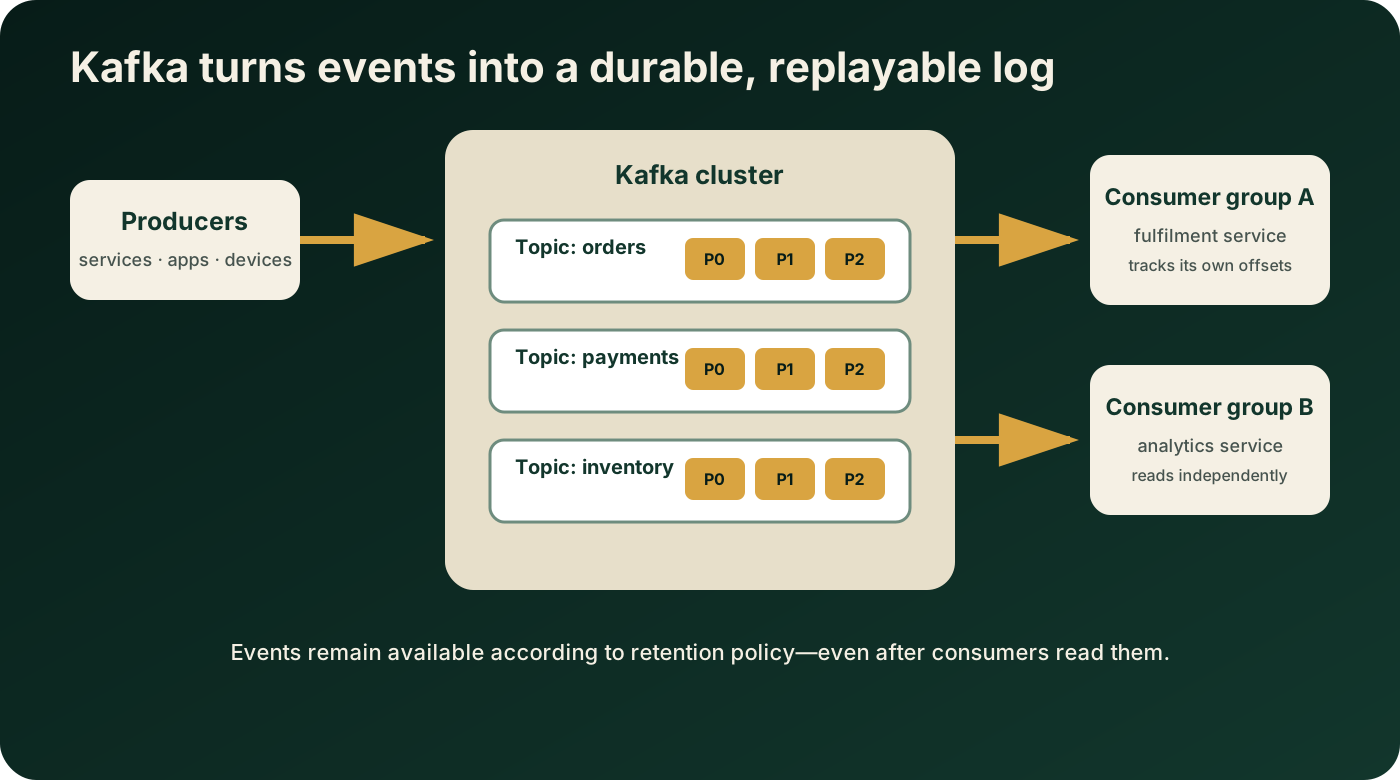
Kafka vocabulary in plain English
| Concept | Meaning | Example |
|---|---|---|
| Event or record | A key, value, timestamp, and optional headers | An order keyed by customer-42 |
| Producer | An application that writes events | Checkout publishes order.created |
| Topic | A named stream of related events | orders.v1 |
| Partition | An ordered shard of a topic | Partition 1 contains selected keys |
| Broker | A Kafka server storing partitions and serving clients | Broker 2 leads partition 1 |
| Offset | A record's position inside one partition | Offset 8142 |
| Consumer group | Consumers cooperating as one logical subscriber | Fulfilment instances share partitions |
| Replica | A copy of a partition on another broker | Leader plus followers |
Topics, partitions, keys, and ordering
A topic is not one global queue. Kafka divides it into partitions so storage and processing can scale across brokers. Each partition is an ordered, immutable sequence. New records are appended and receive increasing offsets.
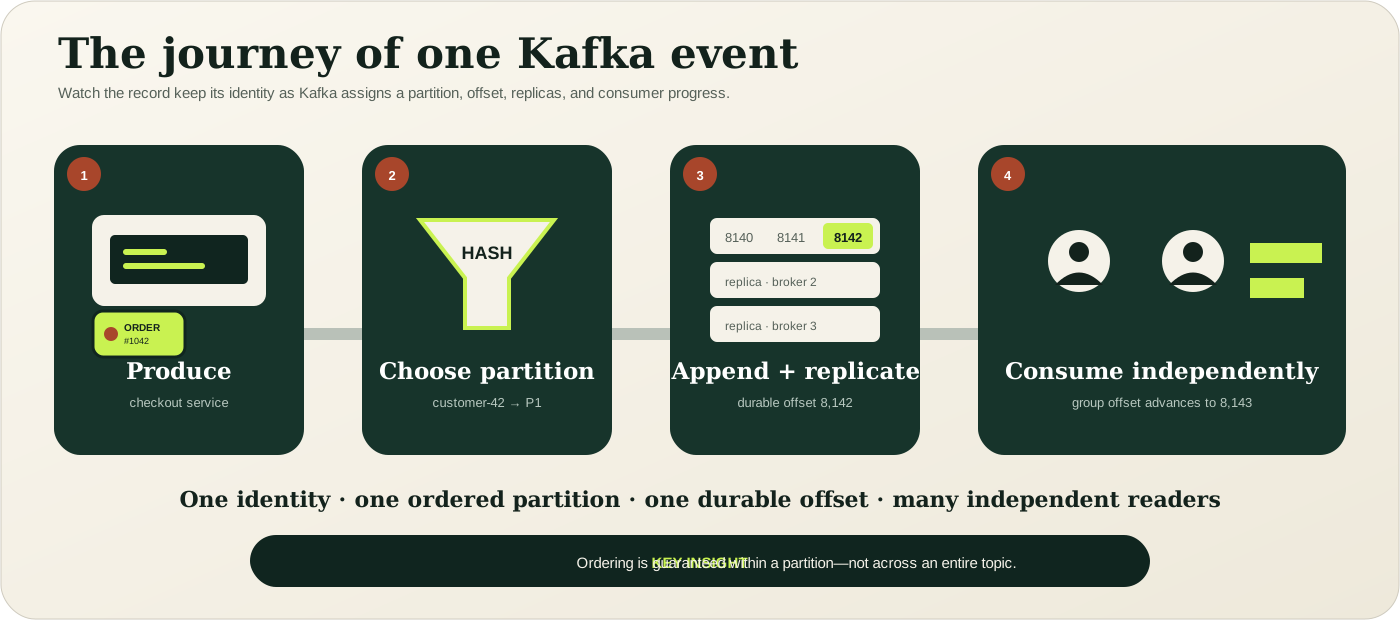
Kafka guarantees ordering within one partition, not across every partition in a topic. A record key lets the producer consistently map related events to the same partition. If every update for customer-42 uses that key, consumers observe those updates in partition order. A random key may improve distribution but gives up per-entity ordering.
Producers and acknowledgements
A producer serializes a key and value, chooses a topic, and sends the record to the broker leading the selected partition. Configuration controls batching, compression, retries, acknowledgements, and idempotence. For important data, acks=all and an idempotent producer are common foundations, but durability also depends on replication, in-sync replica policy, broker configuration, and failure handling.
Consumers, groups, and offsets
Consumers using the same group ID divide assigned partitions between them, so one partition is processed by one member of that group at a time. A different group has an independent view and can read the same events for another purpose. Fulfilment, analytics, search indexing, and fraud detection can consume the same order stream without separate point-to-point copies.
The group records committed offsets—its durable reading positions. If processing fails before an offset is committed, a record may arrive again. If an offset is committed before a side effect succeeds, the event may be skipped after a crash. Production consumers therefore commonly target at-least-once delivery and make business operations idempotent.
Retention and replay
Kafka retains events according to time or size limits, or compacts a topic by key when configured to preserve the latest value for each key. Consumption and retention are separate. A consumer can reset offsets to replay retained history, rebuild a derived view, reproduce a bug, or bootstrap a new application.
Replay is powerful, but external side effects—payments, emails, and database writes—must tolerate duplicates or be guarded by event IDs and an idempotency ledger. Event contracts must remain interpretable across schema versions.
Replication, brokers, and KRaft
A cluster contains one or more brokers. Topic partitions are distributed across them, and production clusters usually replicate partitions. One replica leads reads and writes; followers copy its log. If the leader fails, Kafka can elect an eligible replica according to cluster state and configuration.
The original article used ZooKeeper. That was correct historical architecture. Modern Kafka uses KRaft, Kafka's Raft-based metadata quorum, and the current official quickstart starts Kafka without ZooKeeper. Do not copy old --zookeeper commands into a current installation.
Kafka's five core APIs
- Admin API: inspect and manage topics, brokers, and configurations.
- Producer API: write event streams.
- Consumer API: subscribe to topics and process records.
- Kafka Streams API: build stateful transformations, joins, windows, and aggregations.
- Kafka Connect API: integrate Kafka with external systems using source and sink connectors.
KNOWLEDGE CHECK · DRAG, DROP, OR TAP
Why use Kafka?
Match each real-world need to the Kafka capability that addresses it.Kafka is not automatically right for every asynchronous task. A simpler queue may be better when replay and retained history are unnecessary. A database normally remains the system of record for transactional state. Kafka also requires capacity planning, security, schema governance, monitoring, and operational expertise.
A modern local exercise
The current official quickstart offers downloaded files and an official Docker image. Version numbers change, so follow the current Apache Kafka quickstart. A minimal Docker start is:
docker pull apache/kafka:latest
docker run --name kafka-quickstart -p 9092:9092 apache/kafka:latest
Create and describe a topic
bin/kafka-topics.sh --create --topic quickstart-events \
  --bootstrap-server localhost:9092

bin/kafka-topics.sh --describe --topic quickstart-events \
  --bootstrap-server localhost:9092
Write two events
bin/kafka-console-producer.sh --topic quickstart-events \
  --bootstrap-server localhost:9092
>order-1001 created
>order-1002 created
Read from the beginning
bin/kafka-console-consumer.sh --topic quickstart-events \
  --from-beginning --bootstrap-server localhost:9092
This proves the core loop: create a retained stream, produce records, and consume them independently. It does not model production security, replication, schemas, capacity, monitoring, failure recovery, or deployment topology.
From exercise to production
- Define topic ownership, contracts, compatibility, retention, partitions, and replication.
- Use TLS, authenticated workload identities, and least-privilege ACLs.
- Choose keys according to ordering and distribution requirements.
- Design producers for acknowledgements, retries, idempotence, and backpressure.
- Design consumers for duplicates, poison records, rebalances, and controlled commits.
- Monitor availability, replication, throughput, latency, consumer lag, disk, and quotas.
- Test broker failure, network interruption, restart, replay, incompatible schemas, and downstream outage.
Where to go next
Continue through advanced configuration, monitoring, Kafka Streams, security, multi-cluster architecture, and the EBX ps-mdm connector. Use OffsetDock to explore topics against its demo cluster, and the PS MDM Kafka Client for the EBX integration.
Source and version note
The historical structure was recovered from the original Datanizant article. Current concepts and commands were checked against the Apache Kafka documentation and official quickstart on October 12, 2026. Always verify the Kafka version you deploy.